I’m trying to automatically configure Openfire as much as possible so less clicks = better in my case.
A thing I’m still struggling with is LDAP admin group configuration. This works fine when I use the web wizard on first boot. But I’m trying to not use that part.
So I created a custom openfire.xml with my settings for the sql database and ldaps in it and all is working well except I can only seem to put specific users from Active Directory as Admin users not whole groups.
Maybe using Groups for admins needs a different approach?
I also would like to configure the monitoring plugin without clicks. Installing is not a problem but after the install it still needs enabling in the web interface.
Hi Chris! It sounds like you’re already well on your way!
To configure groups as admins, rather than individual users, you should not use admin.authorizedJIDs which is probably what you’re using now. It only supports individual users.
Instead, you want something like (I’m doing this from memory without testing) to configure Openfire to use group-based administrators:
There are alternative approaches (which do not exactly cover what you’re asking) which may be of interest to you, too. These are documented here: Openfire: Separating Administrative Users Guide
For the monitoring plugin, exactly which ‘enabling’ are you referring to? Most configuration options can be set in openfire.xml (although I’m not quite sure if that works for every option for every plugin). In the end, those are stored as database values, so an alternative/hacky approach could be to preprovision your database.
Edit: I figured out that after creating the container using the openfire.xml below it did not work. However if I reboot the container after first creation the Active Directory group containing the admins are all able to log in. So issue solved.
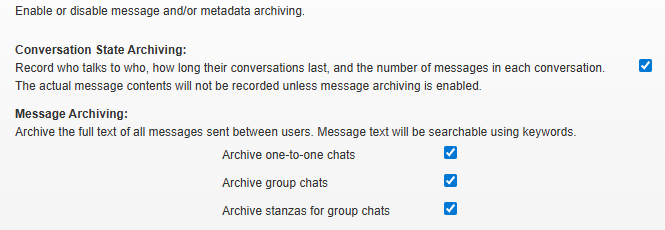
As for the monitoring plugin I have to manually enable the archiving features after first boot(4 checked checkboxes on the print screen). I was indeed already looking into an Database initialize script/file to do this but maybe there is or was an easier way to automate this.
Thanks for your reply! I have been struggling to implement the advice you gave. Below I added my
current setup with the single admin user which is working fine. I also added the whole openfire.xml I used to try and implement the ldap group based admins.
When I use a non existing ldap group I get the following error in the openfire.log. 2026.05.11 08:13:32.411 ERROR [main]: org.jivesoftware.openfire.admin.GroupBasedAdminProvider - Unable to retrieve members of group ‘Admins’ - assuming no administrators
Then when using an existing group no errors are present in the openfire.log indicating to me that all is good, but I am not able to log into the admin console with a user from the used ldap group.
Hi @Chris102 - good to hear you made progress! As the discussion is fanning out to multiple topics, I’ll try to keep things nice and separated by responding in a couple distinct comments.
These settings are stored in the following system properties:
conversation.metadataArchiving
conversation.messageArchiving
conversation.roomArchiving
conversation.roomArchivingStanzas
All Openfire system properties (except for the ones that we haven’t migrated yet - but that’s unrelated) can be set through openfire.xml by providing them outside of the autosetup element. Their name is converted by treating every name betwee dots (.) as element names that are nested. For the four properties that you’re after, you can do something like this:
<jive>
    <autosetup>
        <!-- unrelated things -->
    </autosetup>

    <!-- more unrelated things -->

    <conversation>
        <metadataArchiving>true</metadataArchiving>
        <messageArchiving>true</messageArchiving>
        <roomArchiving>true</roomArchiving>
        <roomArchivingStanzas>true</roomArchivingStanzas>
    </conversation>
</jive>
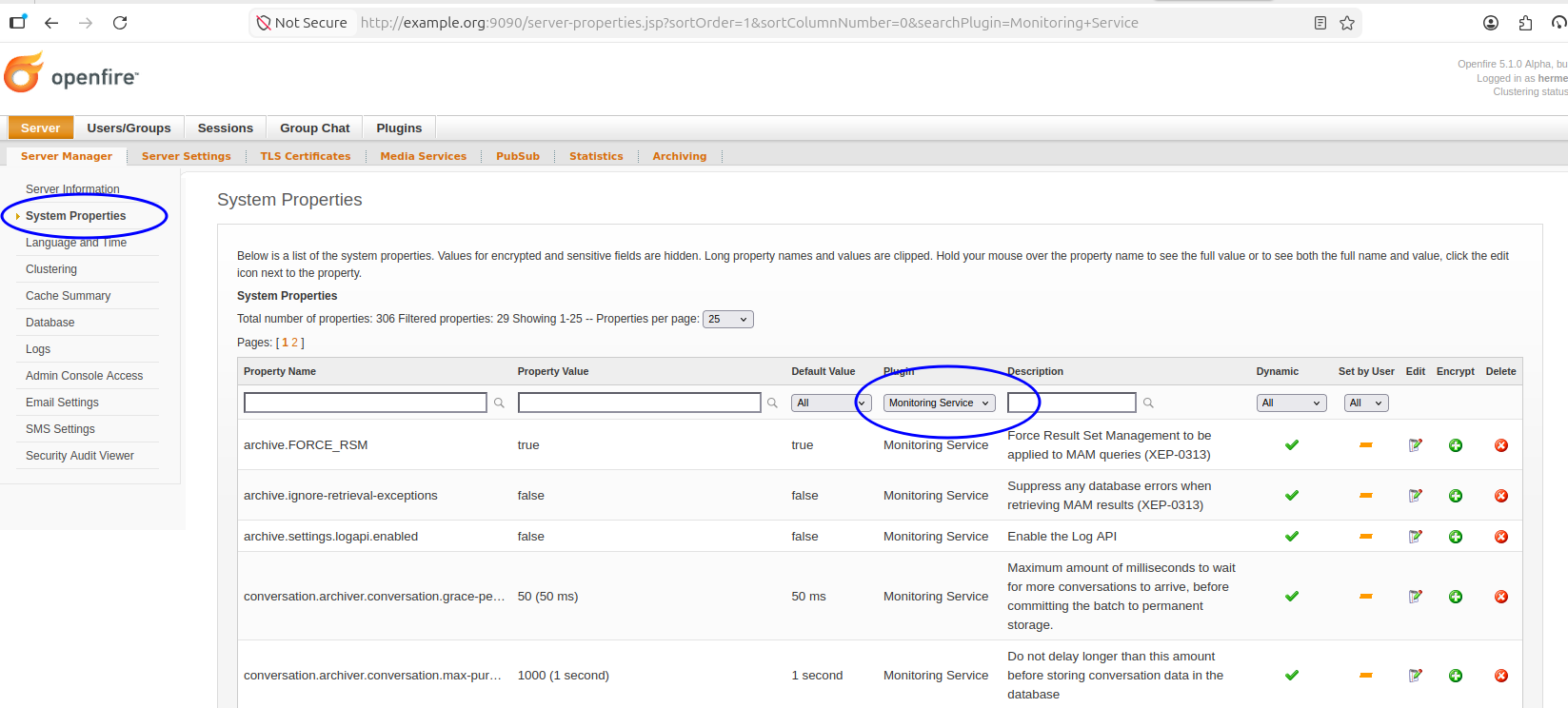
You can also set most other properties like this. To find out what property names are used, you can use the admin console’s “System Properties” page. If you filter for the name of the plugin, you get a listing of all its properties. You’ll probably be able to identify the ones you’re after from their name, description, and current or default values.
You’re saying that you needed a reboot to get Openfire to recognize that admin users? That is unexpected.
I have tested this locally, but I could immediately log in with an LDAP-provided user, where the permission was granted through group membership of an LDAP-provided group.
For my test, I used a development build of Openfire (which is soon-to-be-released as 5.1.0). I used a local, empty MySQL server (which I happened to have installed), and Rafael Römhild’s docker-based OpenLDAP test server.
Directly after startup, I could log in with one of the accounts that are in the admin_staff group (I used hermes/hermes).
The only thing that I think could be a relevant difference between our setups is that I did not use a container. Can you find out maybe if the containerization is relevant in reproducing this problem? Anything else? I’d love to get this ‘needs a reboot’ to be fixed!
As an aside: with the current implementation of Openfire’s ‘autosetup’ combined with using a non-default user/auth provider, I did notice a small bug. Openfire tries unconditionally to set the password and email address of a user named admin - even if you don’t have such a user. This can cause a stack trace like this to be logged in the console:
org.jivesoftware.openfire.user.UserNotFoundException
	at org.jivesoftware.openfire.ldap.LdapUserProvider.loadUser(LdapUserProvider.java:176)
	at org.jivesoftware.openfire.user.UserManager.getUser(UserManager.java:282)
	at org.jivesoftware.openfire.XMPPServer.runAutoSetup(XMPPServer.java:521)
	at org.jivesoftware.openfire.XMPPServer.initialize(XMPPServer.java:404)
	at org.jivesoftware.openfire.XMPPServer.start(XMPPServer.java:675)
	at org.jivesoftware.openfire.XMPPServer.<init>(XMPPServer.java:223)
	at java.base/jdk.internal.reflect.DirectConstructorHandleAccessor.newInstance(DirectConstructorHandleAccessor.java:62)
	at java.base/java.lang.reflect.Constructor.newInstanceWithCaller(Constructor.java:499)
	at java.base/java.lang.reflect.ReflectAccess.newInstance(ReflectAccess.java:79)
	at java.base/jdk.internal.reflect.ReflectionFactory.newInstance(ReflectionFactory.java:189)
	at java.base/java.lang.Class.newInstance(Class.java:715)
	at org.jivesoftware.openfire.starter.ServerStarter.start(ServerStarter.java:92)
	at org.jivesoftware.openfire.starter.ServerStarter.main(ServerStarter.java:56)
I do not think that there’s a functional impact, but it’s confusing, and should be avoided. I’ve raised a ticket (OF-3276) for this, which will likely be resolved in Openfire 5.1.0.
I will recreate my whole setup without docker next week to look if it still needs a reboot when not run in docker. For now I’m also thinking it might have to do with how I’m seeding the openfire.xml into the docker image. As I am quite new to using docker and openfire I resulted into using a dockerfile to create a custom image with the custom openfire.xml in it using the official openfire docker image as base.
Dockerfile:
# Use the official Openfire image as the base
FROM ghcr.io/igniterealtime/openfire:latest

# Set the environment variable for Openfire's home directory
ENV OPENFIRE_HOME=/usr/local/openfire

# Rename/move directories
RUN mv /usr/local/openfire/conf_org /usr/local/openfire/conf \
   && mv /usr/local/openfire/resources/security_org /usr/local/openfire/resources/security \
   && mv /usr/local/openfire/plugins_org /usr/local/openfire/plugins \
   && chown -R openfire:openfire /usr/local/openfire/conf /usr/local/openfire/plugins /usr/local/openfire/resources/security

# Copy custom openfire.xml and plugins into the container's directories
COPY ./openfire.xml /usr/local/openfire/conf/openfire.xml
COPY ./jsxc.jar /usr/local/openfire/plugins/jsxc.jar
COPY ./monitoring.jar /usr/local/openfire/plugins/monitoring.jar

# Expose the required ports
EXPOSE 9090 9091 5222 5223 8080 8443 7777 80 443 3478 3479 5229 5269 5270

# Start Openfire using the openfire.sh script
ENTRYPOINT ["/usr/local/openfire/bin/openfire.sh"]
Ok, so I spend all morning on this, and somehow I was not able to reproduce this . I then also went back to my original setup with the issues and they were also not present. So I guess no issues after all.
The situations I tested:
Both of these used my original openfire.xml.
Clean installed Debian 13 VM with PostgresSQL16 running in a docker container and openfire_5.0.5_all.deb to install openfire.
Clean installed Debian 13 VM with PostgresSQL16 running in a docker container and openfire 5.0.4 running in a docker container(copy of the original setup).
This is exactly what I was hoping and looking for! I don’t know if I missed something in the docs. But this is of great help to get a cleaner setup with less scripts.

 . I then also went back to my original setup with the issues and they were also not present. So I guess no issues after all.