Edit: I figured out that after creating the container using the openfire.xml below it did not work. However if I reboot the container after first creation the Active Directory group containing the admins are all able to log in. So issue solved. 
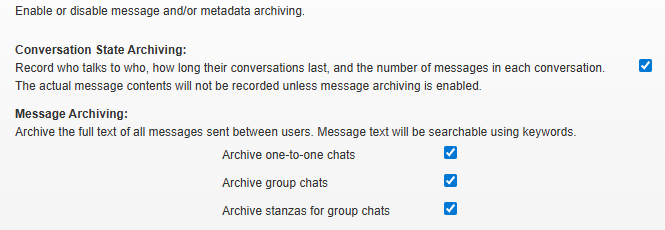
As for the monitoring plugin I have to manually enable the archiving features after first boot(4 checked checkboxes on the print screen). I was indeed already looking into an Database initialize script/file to do this but maybe there is or was an easier way to automate this.
Thanks for your reply! I have been struggling to implement the advice you gave. Below I added my
current setup with the single admin user which is working fine. I also added the whole openfire.xml I used to try and implement the ldap group based admins.
When I use a non existing ldap group I get the following error in the openfire.log.
2026.05.11 08:13:32.411 ERROR [main]: org.jivesoftware.openfire.admin.GroupBasedAdminProvider - Unable to retrieve members of group ‘Admins’ - assuming no administrators
Then when using an existing group no errors are present in the openfire.log indicating to me that all is good, but I am not able to log into the admin console with a user from the used ldap group.
Single User Admin.
<provider>
    <user>
      <className>org.jivesoftware.openfire.ldap.LdapUserProvider</className>
    </user>
    <auth>
      <className>org.jivesoftware.openfire.ldap.LdapAuthProvider</className>
    </auth>
    <group>
      <className>org.jivesoftware.openfire.ldap.LdapGroupProvider</className>
    </group>
</provider>
    <admin>
    <authorizedUsernames>MY_ADMIN_LDAP_USERNAME</authorizedUsernames>
  </admin>
Group based admin.
<jive>
<autosetup>
        <run>true</run>
        <locale>en</locale>
        <connectionProvider>
            <className>org.jivesoftware.database.EmbeddedConnectionProvider</className>
        </connectionProvider>
        <xmpp>
            <domain>openfire.my.domain</domain>
            <fqdn>openfire.my.domain</fqdn>
           <socket>
                <ssl>
                    <active>true</active>
                </ssl>
            </socket>
        </xmpp>
         <encryption>
           <algorithm>AES</algorithm>
            <key>TheEncryptionKey123</key>
        </encryption>
             <database>
            <mode>standard</mode>
            <defaultProvider>
                <driver>org.postgresql.Driver</driver>
                <serverURL>jdbc:postgresql://postgres:5432/openfire</serverURL>
                <username>openfire</username>
                <password>openfire</password>
                <minConnections>5</minConnections>
                <maxConnections>25</maxConnections>
                <connectionTimeout>1.0</connectionTimeout>
            </defaultProvider>
        </database>
        <authprovider>
            <mode>ldap</mode>
        </authprovider>
</autosetup>
<adminConsole>
 <port>9090</port>
 <secureport>9091</secureport>
 <interface>0.0.0.0</interface>
</adminConsole>
       <ldap>
            <host>my.domain.controller</host>
            <port>636</port>
            <sslEnabled>true</sslEnabled>
            <startTlsEnabled>false</startTlsEnabled>
            <usernameField>sAMAccountName</usernameField>
            <nameField>displayName</nameField>
            <emailField>mail</emailField>
            <baseDN>BASE_DN_FOR_USERS</baseDN>
            <adminDN>CN_OF_MY_LDAP_USER</adminDN>
            <adminPassword>LDAP_USER_PASSWORD</adminPassword>
             <searchFilter>(objectClass=organizationalPerson)</searchFilter>
              <groupMemberField>member</groupMemberField>
            <groupDescriptionField>description</groupDescriptionField>
            <posixMode>false</posixMode>
            <groupSearchFilter>(objectClass=group)</groupSearchFilter>
      </ldap>
<provider>
    <user>
        <className>org.jivesoftware.openfire.ldap.LdapUserProvider</className>
    </user>
    <auth>
        <className>org.jivesoftware.openfire.ldap.LdapAuthProvider</className>
    </auth>
    <group>
        <className>org.jivesoftware.openfire.ldap.LdapGroupProvider</className>
        <groupBasedAdminProvider>
            <groupName>ADMIN_GROUP</groupName>
        </groupBasedAdminProvider>
    </group>
    <admin>
        <className>org.jivesoftware.openfire.admin.GroupBasedAdminProvider</className>
    </admin>
</provider>
</jive>
My openfire.xml is an edited version of the one posted by spricer here: https://discourse.igniterealtime.org/t/autosetup-with-ldap-integration-active-directory/93651/4