XEP-0398 is already implemented from Openfire 5.0.1 +. However i confess that there might be some issues going on. Since sometimes i can see Guus avatar, and sometimes it becomes a G. maybe it might also be a client, updating the avatar from other than what was uploaded or something. hard to track down, maybe upload an avatar(on Conversations, or PSI) then keep looking at the logs, and log in with the other client.
Thank you for your helpful response! I’ve done some investigation based on your suggestions and wanted to share my findings about why Psi doesn’t see avatars from Conversations.
Problem root cause (based on my investigation):
Conversations uses XEP-0084 (PEP avatars) published to ofPubsubItem table:
Psi uses XEP-0153 (vCard-based avatars) looking in ofVCard table.
Database queries confirmed:
sql
-- User 'active' (Conversations client):
SELECT * FROM ofPubsubNode WHERE serviceID='active@xmpp.free' AND nodeID LIKE '%avatar%';
-- Returns: urn:xmpp:avatar:data, urn:xmpp:avatar:metadata

SELECT username FROM ofVCard WHERE username='active';
-- Returns: NO RECORD (empty)

-- User 'psi' (Psi client):
SELECT username, LENGTH(vcard) FROM ofVCard WHERE username='psi';
-- Returns: psi | 15023 (has vCard)
Key findings:
active@xmpp.free (Conversations): Has PEP avatar but NO vCard
psi@xmpp.free (Psi): Has BOTH PEP avatar AND vCard
Conclusion: Avatars exist in PEP but aren’t synchronized to vCard.
Why XEP-0398 isn’t working for me:
Although Openfire 5.0.3 should support XEP-0398 (Avatar Conversion), I’m experiencing either:
I will try to bring this up with Guus(the developer who introduced this feature, and one of the main developers for Openfire). But since we are at this New year period and so on, might take a while. I did test this feature in the past, and it was working, however i see that neither Gajim or Conversations are acknowledging the feature. I am wondering if i am misremember testing it or if something else is going wrong.
But AFAIK there is no setting, it should work right out of the bat. and should work both ways right? Vcard to PEP and vice versa(not sure didnt read the spec).
Sorry i was incorrect. there is a system property, create this property, and set its value to false avatar.xep0398.disabled If you can, after creating it restart the server, and test it(probably need to upload avatar again?), then let us know(if not much trouble).
[edited] Sorry, after reviewing, i discovered that it is enabled by default. so should work.
And Openfire is really not advertising this feature(at least mine).
Thank you for the clarification about the system property. I’ve conducted further investigation and would like to share some surprising findings that might help understand the root cause.
Initial Assumption (Incorrect):
I initially believed that Conversations stores avatars exclusively in PEP (without vCard synchronization), and my database queries seemed to confirm this:
active@xmpp.free (Conversations user): Had PEP avatars but NO vCard entry
psi@xmpp.free (Psi user): Had BOTH PEP avatars AND vCard
Weekend Development & Discovery:
Over the weekend, I attempted to write a plugin (though I must admit I’m not very skilled at plugin development) to copy PEP avatar data to vCard. Despite struggling with the JSP management page (which I couldn’t get working properly), the core functionality worked:
username: active
vcard_size: 8950 bytes
preview: <vCard xmlns="vcard-temp"><PHOTO xmlns="">...
The plugin successfully copied the PEP avatar to the vCard table.
Current Behavior:
Psi client: NOW DISPLAYS the avatar correctly (using vCard)
Conversations client: STILL DOES NOT DISPLAY the avatar
Another.im (Conversations fork): Same issue - no avatar display
Key Questions & Observations:
1. Where does Conversations look for avatars?
If Conversations truly uses only PEP (XEP-0084) as previously assumed, then:
Why doesn’t it display the avatar that’s clearly present in ofPubsubItem?
Is there a configuration issue or bug in Conversations’ PEP subscription?
2. Possible Scenarios:
A) Conversations has a bug in PEP avatar retrieval B) Conversations uses a different PEP node or expects different data format C) There’s a subscription/notification issue in Openfire’s PEP implementation D) Conversations might actually be checking vCard as a fallback (and finding the converted avatar), but still not displaying it for some reason
I don’t have any avatars. Only the avatar in the client where I installed it, on the exact device where I installed it. However, the avatar is in the database in urn:xmpp:avatar:data.
OF: 5.0.3 - 5.0.4
JDK: Eclipse 21
OS: Windows Server 2025
Default installation.
Clients: Gajim and Conversation.
Thank you for sharing your experience. I completely understand your frustration, as I’ve encountered the exact same issue with avatars in Openfire 5.0.3–5.0.4.
Over the past few weeks, I also tried to solve the problem by writing a custom plugin that copies avatar data between database tables (ofPubsubItem ↔ ofVCard). Technically, the plugin works — the data gets copied correctly. However, even with that in place, the avatar synchronization between clients (Conversations, Gajim, Psi) remains broken. So unfortunately, a simple database workaround is not enough.
At this point, I’ve come to the sad conclusion that the development team either lacks the resources or the priority to fix this issue properly. I’ve been using Openfire since version 3 and have always appreciated the project, but this avatar interoperability problem seems to have no real solution in the Community Edition.
Because of this, I’ve started evaluating other XMPP servers. In my recent tests with alternative servers (I won’t name them here to avoid advertising), avatar exchange between Conversations, Gajim, and other clients worked out of the box without any extra plugins or hacks.
I truly hope the Openfire team will prove me wrong and address XEP-0398 implementation in a future release. But for now, I’m seriously considering migrating away from Openfire, and it breaks my heart to say this after so many years of loyal use.
Thanks. I tried everything too, and nothing worked. It’s really disappointing that Openfire treats its customers this way. I can’t use another server. I need a Windows one, while other powerful and efficient ones run on Linux (I tried it and liked it). I’ll wait and see if they fix it someday. It’s not a big deal to me, I just don’t understand why….
I noticed that support for XEP-0398 has been removed in the latest releases. It is possible that the developers temporarily removed it in order to improve the functionality.
However, it is still present in the source code on GitHub, and it is also included in the nightly builds.
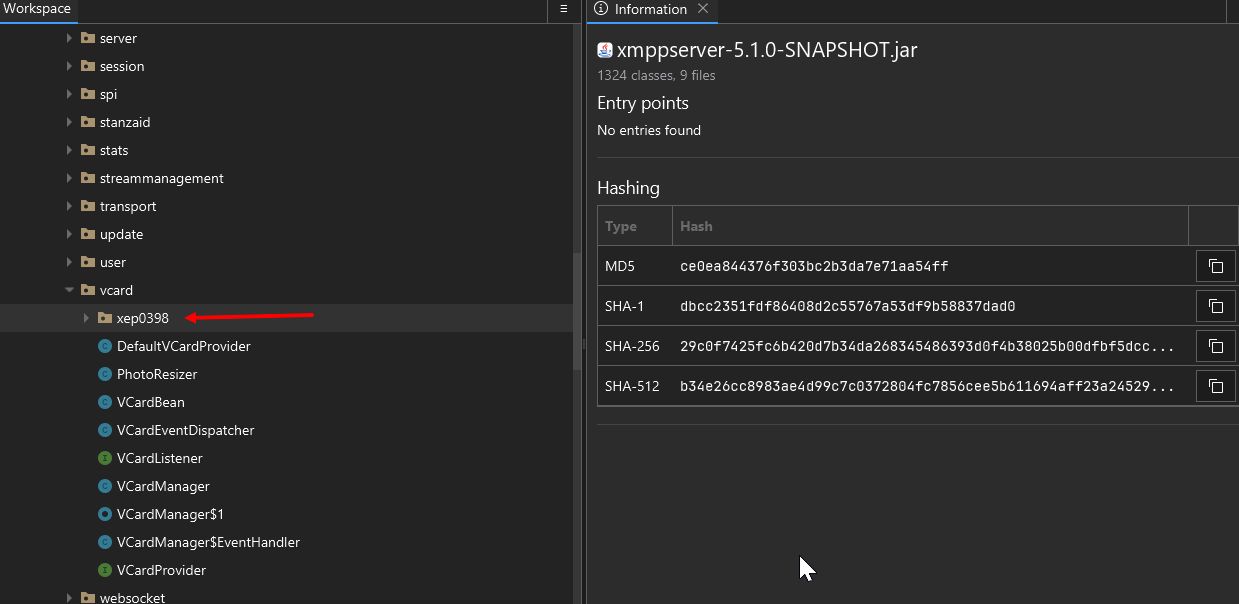
I installed and tested the latest nightly build 5.1.0-SNAPSHOT. It appears to work stably at first glance, and there are no issues with avatars in Gajim and Conversations.
Hi Nomak! What makes you think it was removed? I don’t think it was? I do not expect any changes for avatars to have been included in our recent 5.0.5 release. With regards to avatars, it should behave similar to 5.0.4.
The code changes related to this have been created quite a long time ago (sadly, the 5.1.0 release has taken longer than we have hoped).
I am glad that you tested the 5.1.0 nightly build, and that avatars seem to be working correct there! If you, or anyone else reading this, can test that more thoroughly, we can improve the chances of this issue being fixed correctly in that release!
Hi. I investigated this more deeply because Gajim did not detect XEP-0398 support from Openfire, and I found some confusing details.
In official releases 5.0.4 and 5.0.5:
urn:xmpp:pep-vcard-conversion:0 is not advertised in disco#info.
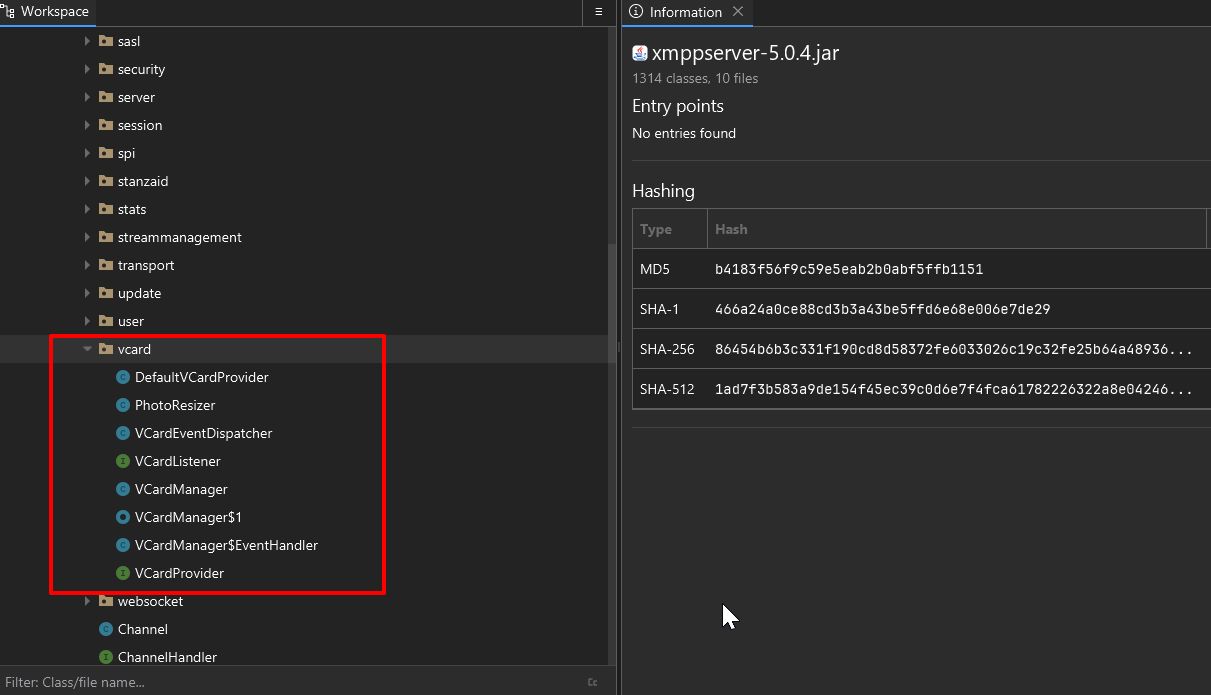
I could not find this namespace string anywhere inside the release xmppserver-5.0.4.jar.
I also could not find UserAvatarToVCardConvertor.class or the org/jivesoftware/openfire/vcard/xep0398 package inside the official release jar.
However, in the current GitHub sources there is a clear XEP-0398 implementation:
xmppserver/src/main/java/org/jivesoftware/openfire/vcard/xep0398/
including:
UserAvatarToVCardConvertor.java
references from VCardManager.java
references from XMPPServer.java