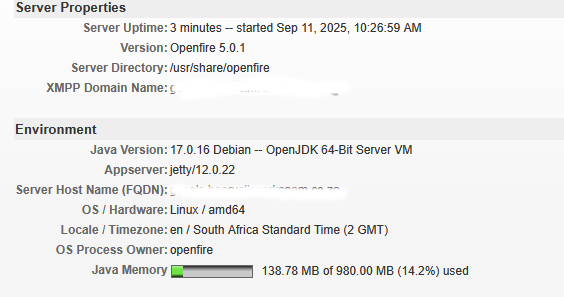
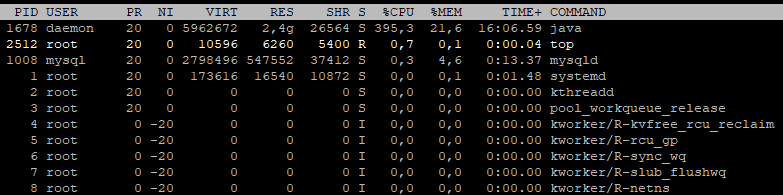
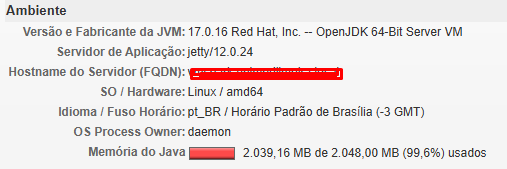
I’m using version 5.0.2 with Oracle Linux 9 and I can’t find the DAEMON_OPTS file in the /opt/openfire/ folder. Can you help me? Java’s memory usage is increasing significantly.
However, when I start the service, it displays the message below:
Job for openfire.service failed because the service did not take the steps required by its unit configuration.
See “systemctl status openfire.service” and “journalctl -xeu openfire.service” for details.
There was no error, that’s exactly what I didn’t notice, but it still shows an error in the output:
journalctl -xeu openfire.service
Nov 19 14:20:13 vmspark systemd[1]: openfire.service: Main process exited, code=exited, status=143/n/a
░░ Subject: Unit process exited
░░ Defined-By: systemd
░░ Support: https://support.oracle.com
░░
░░ An ExecStart= process belonging to unit openfire.service has exited.
░░
░░ The process’ exit code is ‘exited’ and its exit status is 143.
Nov 19 14:20:13 vmspark systemd[1]: openfire.service: Failed with result ‘exit-code’.
░░ Subject: Unit failed
░░ Defined-By: systemd
░░ Support: https://support.oracle.com
░░
░░ The unit openfire.service has entered the ‘failed’ state with result ‘exit-code’.
Nov 19 14:20:13 vmspark systemd[1]: Stopped SYSV: Openfire is an XMPP server..
░░ Subject: Unit openfire.service has completed shutdown
░░ Defined-By: systemd
░░ Support: https://support.oracle.com
░░
░░ The openfire.service unit has completed shutdown.
Nov 19 14:20:13 vmspark systemd[1]: Starting SYSV: Openfire is an XMPP server…
░░ Subject: Unit openfire.service being started
░░ Defined-By: systemd
░░ Support: https://support.oracle.com
░░
░░ The unit openfire.service is being started.
Nov 19 14:20:13 vmspark su[6350]: (to daemon) root on none
Nov 19 14:20:13 vmspark su[6350]: pam_unix(su:session): session opened for user daemon(uid=2) by (uid=0)
Nov 19 14:20:13 vmspark su[6350]: pam_unix(su:session): session closed for user daemon
Nov 19 14:20:13 vmspark openfire[6341]: Starting openfire:
Nov 19 14:20:14 vmspark systemd[1]: Started SYSV: Openfire is an XMPP server..
░░ Subject: Unit openfire.service has completed initialization
░░ Defined-By: systemd
░░ Support: https://support.oracle.com
░░
░░ The openfire.service unit has completed initialization.
░░
░░ The start-up result is done.
/etc/sysconfig/openfire
OPENFIRE_OPTS=“-Xms1024m -Xmx2048m”
If you wish to override the auto-detected JAVA_HOME variable, uncomment
Try looking at the logs from Openfire. You should find them in a directory called logs that is a subdirectory of the directory where you installed Openfire (it most likely is /opt/openfire/logs/).
You could try to remove everything from that logs directory (to get rid of old data), then try to restart Openfire, and then inspect the files that are generated in that directory. If there is a file named nohup.out, then that’s of particular interest (but also look in any other files)!
Despite all the changes, the processor and memory problems persist even with only one person connected.
nohup.out
Finished processing all plugins.
An exception was thrown when one of the pluginManagerListeners was notified of a ‘monitored’ event!
Exception in thread “timer-monitoring” java.lang.OutOfMemoryError: Java heap space
Exception in thread “pool-fastpath7” java.lang.OutOfMemoryError: Java heap space
An unexpected exception occurred:
Exception in thread “jetty-immediate-executor” java.lang.OutOfMemoryError: Java heap space
Exception in thread “timer-fastpath” java.lang.OutOfMemoryError: Java heap space
Exception in thread “archive-service-worker-3” java.lang.OutOfMemoryError: Java heap space
Exception in thread “saxReaderUtil-8” java.lang.OutOfMemoryError: Java heap space
From this log, it seems that the problem occurs after plugins are loaded. Maybe the problem is caused by a plugin. Try removing plugins, to see if you can identify one specific plugin that is the source of the problem.
Although it proves nothing, it is suspicious that the problem is logged as a side-effect of loading plugins. Please remove all plugins to see if any of them causes this.
I tried everything, the plugins worked, all the errors stopped, but only one person can connect to Spark and it freezes the Openfire web server.
ERROR StatusConsoleListener Caught exception executing shutdown hook null
java.lang.OutOfMemoryError: Java heap space
at java.base/java.util.Arrays.copyOf(Arrays.java:3481)
at java.base/java.util.concurrent.ConcurrentHashMap$CollectionView.toArray(ConcurrentHashMap.java:4471)
at java.base/java.util.ArrayList.addAll(ArrayList.java:670)
at org.apache.logging.log4j.spi.LoggerRegistry.getLoggers(LoggerRegistry.java:134)
at org.apache.logging.log4j.spi.LoggerRegistry.getLoggers(LoggerRegistry.java:129)
at org.apache.logging.log4j.core.LoggerContext.updateLoggers(LoggerContext.java:739)
at org.apache.logging.log4j.core.LoggerContext.updateLoggers(LoggerContext.java:729)
at org.apache.logging.log4j.core.LoggerContext.stop(LoggerContext.java:375)
at org.apache.logging.log4j.core.LoggerContext$1.run(LoggerContext.java:305)
at org.apache.logging.log4j.core.util.DefaultShutdownCallbackRegistry$RegisteredCancellable.run(DefaultShutdownCallbackRegistry.java:119)
at org.apache.logging.log4j.core.util.DefaultShutdownCallbackRegistry.run(DefaultShutdownCallbackRegistry.java:78)
at java.base/java.lang.Thread.run(Thread.java:840)
I’m sorry that you have to go through this. I think it’s time that we bring in the expert tools to diagnose this.
What you’ll need to do is create a Java heap dump (not a thread dump) of Openfire when it is running out of memory. There are various ways to do that. Many of them are documented here: https://www.baeldung.com/java-heap-dump-capture
When we have a heap dump, we can use memory analyzers to find out what is occupying all that memory.
@Ramonn maybe you can temporary increase XMX to 15Gb and then try again? You may also try to disable some plugins like the PackerFilter of the XML Debug: they shouldn’t affect users.
Once OF started and if it worked then you may try to reduce again the memory limit down to 2Gb.
As a general tip to improve performance you may try a newer Java 21 or even newer available in your Linux Distro. In the Debian 12 it may be missing but you may use the extrepo to install from zulu-openjdk or something else.
This year the Debian had a new stable release Debian 13 that should have newer OpenJDK packages.
Also please ensure that you are not use the embedded DB (HQSQL) but using a good DB server like PostgreSQL or at least MySQL/MariaDB.