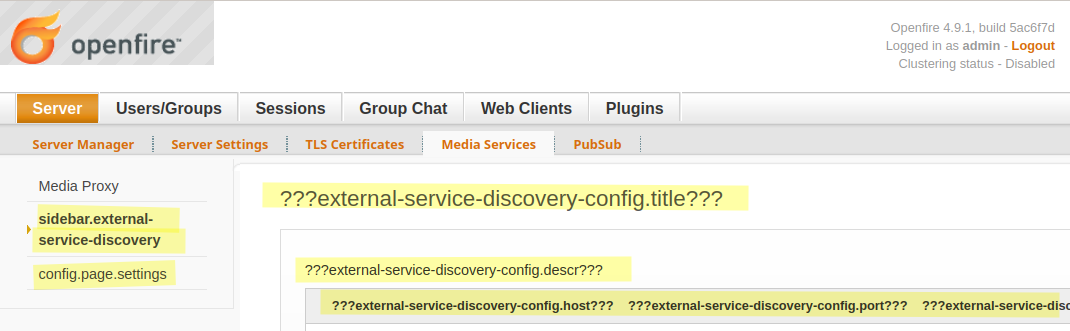
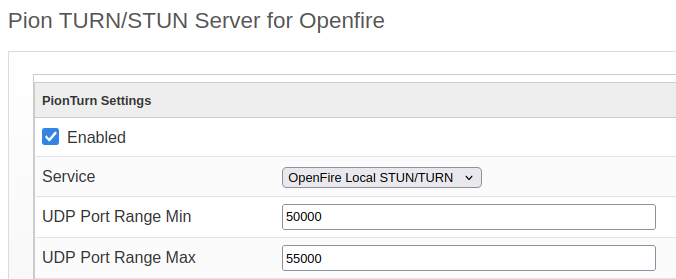
We are running OpenFire for quite a few years but never tried to use JingleNodes plugin. Now we want to experiment with it, and we loaded it and got the new tab under admin UI, Server, but when we click that tab we get a white screen with nothing in the source code.
I went through the logs, but without knowing what specifically to look for I could only pick this exception out:
[PluginMonitorExec-2]: org.jivesoftware.openfire.container.PluginServlet - An unexpected problem occurred while attempting to register servlets for plugin 'org.jinglenodes.JingleNodesPlugin@b92fcaa'.
org.dom4j.DocumentException: Error on line 3 of document file:///C:/Program%20Files/Openfire/bin/../plugins/jinglenodes/web/WEB-INF/web.xml : DOCTYPE is disallowed when the feature "http://apache.org/xml/features/disallow-doctype-decl" set to true.
	at org.dom4j.io.SAXReader.read(SAXReader.java:511) ~[dom4j-2.1.4.jar:?]
	at org.dom4j.io.SAXReader.read(SAXReader.java:325) ~[dom4j-2.1.4.jar:?]
	at org.jivesoftware.util.WebXmlUtils.asDocument(WebXmlUtils.java:47) ~[xmppserver-4.9.1.jar:4.9.1]
	at org.jivesoftware.openfire.container.PluginServlet.registerServlets(PluginServlet.java:168) [xmppserver-4.9.1.jar:4.9.1]
	at org.jivesoftware.openfire.container.PluginManager.loadPlugin(PluginManager.java:624) [xmppserver-4.9.1.jar:4.9.1]
	at org.jivesoftware.openfire.container.PluginMonitor$MonitorTask$4.call(PluginMonitor.java:380) [xmppserver-4.9.1.jar:4.9.1]
	at org.jivesoftware.openfire.container.PluginMonitor$MonitorTask$4.call(PluginMonitor.java:368) [xmppserver-4.9.1.jar:4.9.1]
	at java.util.concurrent.FutureTask.run(FutureTask.java:264) [?:?]
	at java.util.concurrent.ThreadPoolExecutor.runWorker(ThreadPoolExecutor.java:1136) [?:?]
	at java.util.concurrent.ThreadPoolExecutor$Worker.run(ThreadPoolExecutor.java:635) [?:?]
	at java.lang.Thread.run(Thread.java:842) [?:?]
Caused by: org.xml.sax.SAXParseException: DOCTYPE is disallowed when the feature "http://apache.org/xml/features/disallow-doctype-decl" set to true.
	at com.sun.org.apache.xerces.internal.util.ErrorHandlerWrapper.createSAXParseException(ErrorHandlerWrapper.java:204) ~[?:?]
	at com.sun.org.apache.xerces.internal.util.ErrorHandlerWrapper.fatalError(ErrorHandlerWrapper.java:178) ~[?:?]
	at com.sun.org.apache.xerces.internal.impl.XMLErrorReporter.reportError(XMLErrorReporter.java:400) ~[?:?]
	at com.sun.org.apache.xerces.internal.impl.XMLErrorReporter.reportError(XMLErrorReporter.java:327) ~[?:?]
	at com.sun.org.apache.xerces.internal.impl.XMLScanner.reportFatalError(XMLScanner.java:1465) ~[?:?]
	at com.sun.org.apache.xerces.internal.impl.XMLDocumentScannerImpl$PrologDriver.next(XMLDocumentScannerImpl.java:898) ~[?:?]
	at com.sun.org.apache.xerces.internal.impl.XMLDocumentScannerImpl.next(XMLDocumentScannerImpl.java:605) ~[?:?]
	at com.sun.org.apache.xerces.internal.impl.XMLNSDocumentScannerImpl.next(XMLNSDocumentScannerImpl.java:112) ~[?:?]
	at com.sun.org.apache.xerces.internal.impl.XMLDocumentFragmentScannerImpl.scanDocument(XMLDocumentFragmentScannerImpl.java:542) ~[?:?]
	at com.sun.org.apache.xerces.internal.parsers.XML11Configuration.parse(XML11Configuration.java:889) ~[?:?]
	at com.sun.org.apache.xerces.internal.parsers.XML11Configuration.parse(XML11Configuration.java:825) ~[?:?]
	at com.sun.org.apache.xerces.internal.parsers.XMLParser.parse(XMLParser.java:141) ~[?:?]
	at com.sun.org.apache.xerces.internal.parsers.AbstractSAXParser.parse(AbstractSAXParser.java:1224) ~[?:?]
	at com.sun.org.apache.xerces.internal.jaxp.SAXParserImpl$JAXPSAXParser.parse(SAXParserImpl.java:637) ~[?:?]
	at org.dom4j.io.SAXReader.read(SAXReader.java:494) ~[dom4j-2.1.4.jar:?]
Does this explain what is causing the plugin to crash?
What is our next step?
We are on version 4.9.1 and I am open to upgrading, just waiting for you to tell me whether I should and to which version.
We run on Java 17.0.10.LTS if it matters.
Also, when I proceeded to play with plugins, i.e. upgraded/downgraded JingleNodes and others, they for some reason showed internal variables instead of their values, on-screen in the admin UI:
Whats the use case? maybe if you install the external service discovery plugin the ??? will go away. but AFAIK jingle stuff is old stuff. would help to know your intentions here.
That usually happens when the plugin name was changed, if you compiled yourself, downloaded then installed via the .jar file make sure that the name of the plugin matches exactly as intended.
We don’t compile anything. It was downloaded from your site. I did however rename the downloaded JAR file after its version, like plugin.1.2.3.jar. Could have that caused the problem?
Now that we got that out of the way, let’s take a step back to Jingle Nodes. I was under impression, likely mistaken, that they are required for voice call support. If I don’t need it, I’ll delete the plugin, but how then do I allow my users to place voice calls? We are currently using a SIP server and clients, but some ask for integrated calls within the XMPP clients of their liking. Currently, they try to place a call but it only rings for them and not for the other side.
calls one to one are usually done via a Turn server. To simplify you need 2 things, a TURN server, and the External Service Discovery. Openfire does have the Pionturn plugin which included documentation explaining how to set up everything. but you can also choose any other turn server of your preference.
We port-forward the range of 50000-55000 to the XMPP server’s host.
Does the TURN server have to be added to the XMPP clients of each user?
Currently my test user calls from their Conversation on Android to Syskin on iOS and hears the ringing. The other end gets the call, picks it up, and sees ‘Connecting…’ while the caller keeps hearing the ringing until it times out.
We are like 90% there, only need to figure out the remaining 10%
I do not understand which ports have to be forwarded in NAT:
inbound 50000-55000 to 50000-55000 on the XMPP host
or
inbound 3478 to 50000 on the XMPP host
or
inbound 50000-55000 to 3478 on the XMPP host
I do not understand why there is a need for a port range in Pion where there is a single port in external service discovery.
All of this is very confusing. Help labels like in other areas of openfire could have helped a lot.
So, you do need to add the credentials(a password, please choose the ephemeral one). after adding the credentials (on the Ext Serv Disco) go again to the Pionturn re-select the ext S Disco profile, save and then reload the Pionturn plugin. after that go to the logs, and check how did Pionturn initialize, at this point is also good to make a test call and check the logs. You can edit sensitive stuff and share the logs with me in PM(for extra privacy)So i can see if i can spot what is going wrong.
Extra: I do not recommend running Pionturn on the 3478, choosing a different port(north) will be much much safer.
Will it not work without credentials?
I do not understand what ephemeral means.
What does this mean?
What should I look for?
I’ll re-post my last-minute edits to the previous reply:
I do not understand which ports have to be forwarded in NAT:
inbound 50000-55000 to 50000-55000 on the XMPP host
or
inbound 3478 to 50000 on the XMPP host
or
inbound 50000-55000 to 3478 on the XMPP host
I do not understand why there is a need for a port range in Pion where there is a single port in external service discovery.
All of this is very confusing. Help labels like in other areas of openfire could have helped a lot.
I do not understand which ports have to be forwarded in NAT:
inbound 50000-55000 to 50000-55000 on the XMPP host :
You have to have the range 50000:55000 Open(but the range can be much shorter, each TURN call will take a few ports, so if your server is small, 1000 ports should be enough like 50000:51000).
The 3478 is a single port, this one the clients will use to reach the Pionturn server(But i dont recommend actually using the 3478, use something else, like 5349 or north of that, helps to reduce abuse.) So yes, 3478, and 50000:55000 all udp.
so, sudo ufw allow 3478/udp sudo ufw allow 50000:55000/udp
and for your nat, keep the ports, 3478 to 3478 and the range 50000:55000 to 50000:55000.
Alas, I still do not understand which ports have to be forwarded where because I am not able to think in terms of ‘open’ or ‘keep’. I am only able to think in terms of port##, IP addresses, and forwarding. Such is my training and experience, and there is nothing I can do about this, short-term.
Let’s go by bullet point format:
Does inbound port 3478 have to be forwarded to port 3478 of the XMPP server host?
Does the inbound range 50000-55000 have to be forwarded to the same range of the XMPP server host?
If ##1-2 above are wrong, then how to correct them?
Great, thanks for confirming this!
One hopefully last question: does the port range 10000-20000 have anything to do with voice calls? I know that openfire is listening on it, but since we currently use SIP this range is forwarded to that, not to openfire.