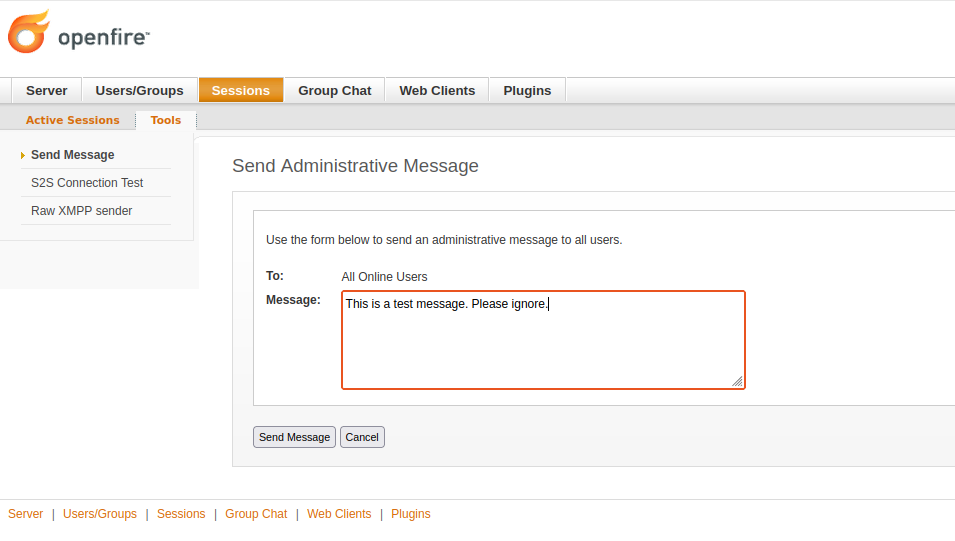
Send Administrative Message disconnects all users immediately

Openfire 4.9.2, Spark 3.0.1

as the title says, all active sessions are disconnected and re-connected within 15 seconds

I have found one other thread that resembles my issue, and I have checked the installed plugins. The only one I have is Search.

The server logs do not show anything, same with the Spark logs

any ideas?

Thanks

That’s curious. I have never experienced this (and am using administrative messages and Spark regularly).

I’m assuming that with ā€˜administrative messages’ you are referring to the broadcasts that you can send via the Admin Console, as shown in this screenshot:

For good measure, I’ve tried it again just now (using development builds Openfire 5.1.0 and Spark 3.0.3), but I cannot reproduce this issue.

Questions that could help narrow it down:

  • Does this happen only when sending a broadcast message, or randomly throughout the day?
  • Are all clients affected simultaneously, or only some?
  • Are clients other than Spark affected?
  • Does this happen with later versions of Openfire?
  • Have you tried enable debug/trace logging in Openfire? I’m curious if that reports the cause of the disconnects.

Thank you!

Other than what I reported here, I haven’t noticed any random disconnections but at the same time, this is a lightly-utilized server so I am only 99% sure :slight_smile:

All at the same time.

TransVerse is affected as well.

Haven’t tested with other versions of OF.

I did enable it but I was only searching for the broadcast message string. I will go back and see what else happens at the same time.

wrote a Powershell script to go through all event logs at the time when this happened, no events except a few from Security log showing I’m using Edge (which is what i’m using to manage Openfire)

the openfire event log shows some events and errors like ā€œpeer not authenticatedā€ and I see a gap of 10 seconds which is how long i stay disconnected and then i re-connect

my session goes through a web proxy, does that matter? Trellix SkyHigh

I’m sorry, none of this makes me think of a possible cause. I’m not sure how to diagnose this.

Perhaps the proxy is of relevance. Can you connect a client without the proxy, to see if that’s affected? Does the proxy generate logs of its own?

THank you for your suggestion. I did just that and the client that was connected directly to the server did NOT get disconnected.

I have forwarded my question to our internal networking team for review

Cheers,

1 Like

Oh, wow - that’s interesting. I wonder how that’s even possible.

For now, I’m thinking that Openfire isn’t directly causing this issue. Let me know what you find!

how many users do you have connected and do you know what your using as a proxy? Assuming a reverse proxy?

yes, i believe this is a reverse proxy. it’s there to: examine chat and traffic, like block certain type of files, log all traffic and to forward the traffic to the appropriate server

It’s Trellix Web proxy (formerly Mcafee)

it’s a lab environment so at the time I was testing there were only 3 users

There you have it! lol
I’m sure the boardcast is triggering a policy violation and dropping the traffic. you should see something in the proxy/trellix logs if that is the case.